Tampilkan postingan dengan label octopus. Tampilkan semua postingan

Jumat, 06 Desember 2013

Octopus Box LG Software v2 4 0 Updates

Added worlds first support for LG A270, LG A270E, LG A275 and additional support for LG A290 cell phones!


Octopus Box LG Software v2.4.0


- Added support for the following models:

  • LG A270 - added worlds first Direct Unlock, Read Codes, Write Firmware, Repair IMEI,
    Read/Write/Repair EEPROM, Read/Write Full Flash, Read Phone Info.
  • LG A270E - added worlds first Direct Unlock, Read Codes, Write Firmware, Repair IMEI,
    Read/Write/Repair EEPROM, Read/Write Full Flash, Read Phone Info.
  • LG A275 - added worlds first Direct Unlock, Read Codes, Write Firmware, Repair IMEI (A/B),
    Read/Write/Repair EEPROM, Read/Write Full Flash, Read Phone Info.
  • LG A290 - added Direct Unlock.

- Added Software manuals for supported phones.
- Released some improvements to the main software.


Worlds first updates and the most stunning solutions - its all Octopus! And theres gonna be more!


Download Octopus Box LG Software v2.4.0
Rabu, 13 November 2013

M715 Anycall unlock done by octopus and change english language success

Toos:
Octopus activated
KH4500 USB Cable


note:

Quote:
unlock first the phone before change english language
Procedure:
set first to phone mode
go to usb settings then choose PHONE and press left soft button
Then Go to Dial window then Type *#9090#
hit #1 to choose (1)URT_USB_DIAG
restart the phone then isnsert usb cable
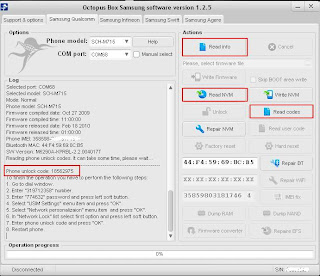
open octopus samsung and select M715
click read info
read NVM then tick READ CODES....


1. Go to dial window.
2. Enter "319712358" number.
3. Enter "774632" password and press left soft button.
4. Select "USIM Settings" menu item and press "OK".
5. Select "Network personalizaion" menu item and press "OK".
6. In "Network Lock" list select first option and press left soft button.
7. Enter phone unlock code and press "OK".
8. Restart phone.
 Unlock done...

change language na naman tayo...

Procedure how to change language:
Quote:
Active Sync must be Installed

Battery Must Full Charge
Connect Turned OFF Phone to PC

Run Octans Flasher and Set Files

Tick PDA and browse for M715 English ROM

Tick MultiCSC and Browse for M715 English CSC

then tick DETECT

then Hold power Button

After its Detected ( Phone must be in Download Mode )

Start Downloading Button in Octans Flasher will High ligth

then tick Start Downloading Button and wait

till flashing process END

wag hugutin ang phone sa PC hanggang sa mag reboot

at lumabas ang TAP THE SCREEN

para mag calibrate ng touch screen


Sabtu, 02 November 2013

Octopus Box LG Software v2 4 0 Updates

Added worlds first support for LG A270, LG A270E, LG A275 and additional support for LG A290 cell phones!


Octopus Box LG Software v2.4.0


- Added support for the following models:

  • LG A270 - added worlds first Direct Unlock, Read Codes, Write Firmware, Repair IMEI,
    Read/Write/Repair EEPROM, Read/Write Full Flash, Read Phone Info.
  • LG A270E - added worlds first Direct Unlock, Read Codes, Write Firmware, Repair IMEI,
    Read/Write/Repair EEPROM, Read/Write Full Flash, Read Phone Info.
  • LG A275 - added worlds first Direct Unlock, Read Codes, Write Firmware, Repair IMEI (A/B),
    Read/Write/Repair EEPROM, Read/Write Full Flash, Read Phone Info.
  • LG A290 - added Direct Unlock.

- Added Software manuals for supported phones.
- Released some improvements to the main software.


Worlds first updates and the most stunning solutions - its all Octopus! And theres gonna be more!


Download Octopus Box LG Software v2.4.0
Posting Lama ►