Tampilkan postingan dengan label display. Tampilkan semua postingan
Tampilkan postingan dengan label display. Tampilkan semua postingan
Rabu, 04 Desember 2013

Selasa, 03 Desember 2013


Jumat, 29 November 2013
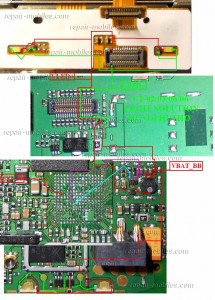
Nokia 1280 New Display Light Solution By Jumpering

Nokia 1280 No Lcd Light Solution Jumper Trick
Kamis, 31 Oktober 2013
Nokia 5730 XpressMusic White display problem repair solution
Nokia 5730 XpressMusic LCD display problem repair solution

Selasa, 29 Oktober 2013
Nokia C2 03 White Screen No LCD Screen Display Problem Solution
Nokia C2-03 White Screen, No LCD Screen Display Problem Solution
This solution covers to fix Display problem for Nokia C2-03, C2-06 and C2-08 Dual SIM card slider phone. These are just simple hints on how to troubleshoot display problems such as white screen, empty or black screen. Im referring display problem that you may still hear an audio from the device like welcome tone, alert tones or ringtones., and this solution covers for hardware troubleshooting only.
Some white screen are cause by a firmware failure. So, if you may try to figure it out either you will do a software or hardware calibration do things as follows.
Power up the device, observe if you can still hear any welcome tone. Try to send message or call the phone and see if the alert or ringtones is still in there. If you do can still hears it, then the problem is on hardware failure, If there is no response at all and just stock in white screen then the problem lies on firmware.
How to fix Nokia C2-03 White screen and other display problems such as blue screen, blank or empty screens.
If you try to fix firmware problem, simply flash the phone to its original firmware version. The firmware version for Nokia C2-03 is RM-702.
If you do have hardware problem, follow the simple hints below.
1) Check the flex and LCD pin to pin connections, ensure that it is properly in good contact. A weak or loosen contacts will cause the display problem.
2) Check the LCD screen for possible damaged or cracked. If you aint sure better have a extra LCD at hand just for a quick test.
3) Check the flex ribbon cable for possible damaged. Since Nokia C2-03 is a slider phone, the possibility of display problem is cause by flex failure.
4) If both the flex and LCD were already confirmed working and okay. You may then proceed in troubleshooting certain components on the Nokia C2-03 PCB board.
5) See the solution below, check the highlighted components surrounding, clean it if there is an oxidation spotted.

View larger image here.
6) Check each of the display filter components, do rework, resolder or replace it.
This solution may also works on Nokia C2-06 and Nokia C2-08 dual SIM card phones, because both are the same as of Nokia C2-03 PCB board.
Some white screen are cause by a firmware failure. So, if you may try to figure it out either you will do a software or hardware calibration do things as follows.
Power up the device, observe if you can still hear any welcome tone. Try to send message or call the phone and see if the alert or ringtones is still in there. If you do can still hears it, then the problem is on hardware failure, If there is no response at all and just stock in white screen then the problem lies on firmware.
How to fix Nokia C2-03 White screen and other display problems such as blue screen, blank or empty screens.
If you try to fix firmware problem, simply flash the phone to its original firmware version. The firmware version for Nokia C2-03 is RM-702.
If you do have hardware problem, follow the simple hints below.
1) Check the flex and LCD pin to pin connections, ensure that it is properly in good contact. A weak or loosen contacts will cause the display problem.
2) Check the LCD screen for possible damaged or cracked. If you aint sure better have a extra LCD at hand just for a quick test.
3) Check the flex ribbon cable for possible damaged. Since Nokia C2-03 is a slider phone, the possibility of display problem is cause by flex failure.
4) If both the flex and LCD were already confirmed working and okay. You may then proceed in troubleshooting certain components on the Nokia C2-03 PCB board.
5) See the solution below, check the highlighted components surrounding, clean it if there is an oxidation spotted.
View larger image here.
6) Check each of the display filter components, do rework, resolder or replace it.
This solution may also works on Nokia C2-06 and Nokia C2-08 dual SIM card phones, because both are the same as of Nokia C2-03 PCB board.
Rabu, 23 Oktober 2013
Nokia C2 00 No Display and Keypad Light LED Solution Connection Jumper Ways
Nokia C2-00 No Display and Keypad Light LED Solution (Connection Jumper Ways )
Heres the solution if it happens that you are troubleshooting Nokia C2-00 LCD Display and or keypad backlight problem caused by wet damaged or anything else.
This guide may help you out if the LCD screen shows a dark screen and or the keypad white LED are not functioning. The solution below shows the connection line paths of the LCD and keypad backlight LED of Nokia C2-00 PCB board. You can easily trace and locate where the possible problem occurred.
On Nokia C2-00, the keypad and LCD white backlight LED were connected in series, so it means if there is one LED is busted the whole backlight circuit will shutdown. For easy troubleshooting, you may first check both of the white LED on keypad, then check also the battery power voltage (VBAT 3.7V) connection.
The LED driver circuit will be the next spot, then check all the corresponding LED+ and LED- connections down to each of the keypad and LCD white LED.

This guide may help you out if the LCD screen shows a dark screen and or the keypad white LED are not functioning. The solution below shows the connection line paths of the LCD and keypad backlight LED of Nokia C2-00 PCB board. You can easily trace and locate where the possible problem occurred.
On Nokia C2-00, the keypad and LCD white backlight LED were connected in series, so it means if there is one LED is busted the whole backlight circuit will shutdown. For easy troubleshooting, you may first check both of the white LED on keypad, then check also the battery power voltage (VBAT 3.7V) connection.
The LED driver circuit will be the next spot, then check all the corresponding LED+ and LED- connections down to each of the keypad and LCD white LED.
Nokia C2-00 Keypad and LCD Display Backlight Connection Tracks

Rabu, 16 Oktober 2013

Langganan:
Postingan (Atom)

